Pipeline Usage
This page details the usage of RAIL in pipeline mode. A RAIL pipeline is an ordered arrangement of RAIL stages, with defined inputs, outputs, and configurations. Like with stages, running RAIL via pipelines is configurable and reproducible. It is the recommended mode of usage for:
well-defined workflows
operating on large data sets
workflows that make use of parallelization
To learn more about RAIL stages, visit the What Are RAIL Stages? page.
What does a pipeline do? Why would you want to make a pipeline?
A RAIL pipeline is a directed acyclic graph of RAIL stages, defined by the
guarantee that the inputs to each stage either exist already or are produced as
output of earlier stages in the pipeline. A pipeline is defined by two .yml
files, containing:
All the configuration parameters for every stage in the pipeline, including each stage’s name and its inputs and outputs
The order in which the stages are to be run
With pipelines, a user can reproduce workflows and outputs. Pipelines allow a user to detail the order of stages to be run, as well as the inputs, outputs, and settings of each stage, prior to execution. Pipelines can also be parallelized. Thus, an example use case would be running RAIL on HPC systems, where the configuration method and parallelization are suited for that workflow.
This is an example of how RAIL stages are arranged in a RAIL pipeline.
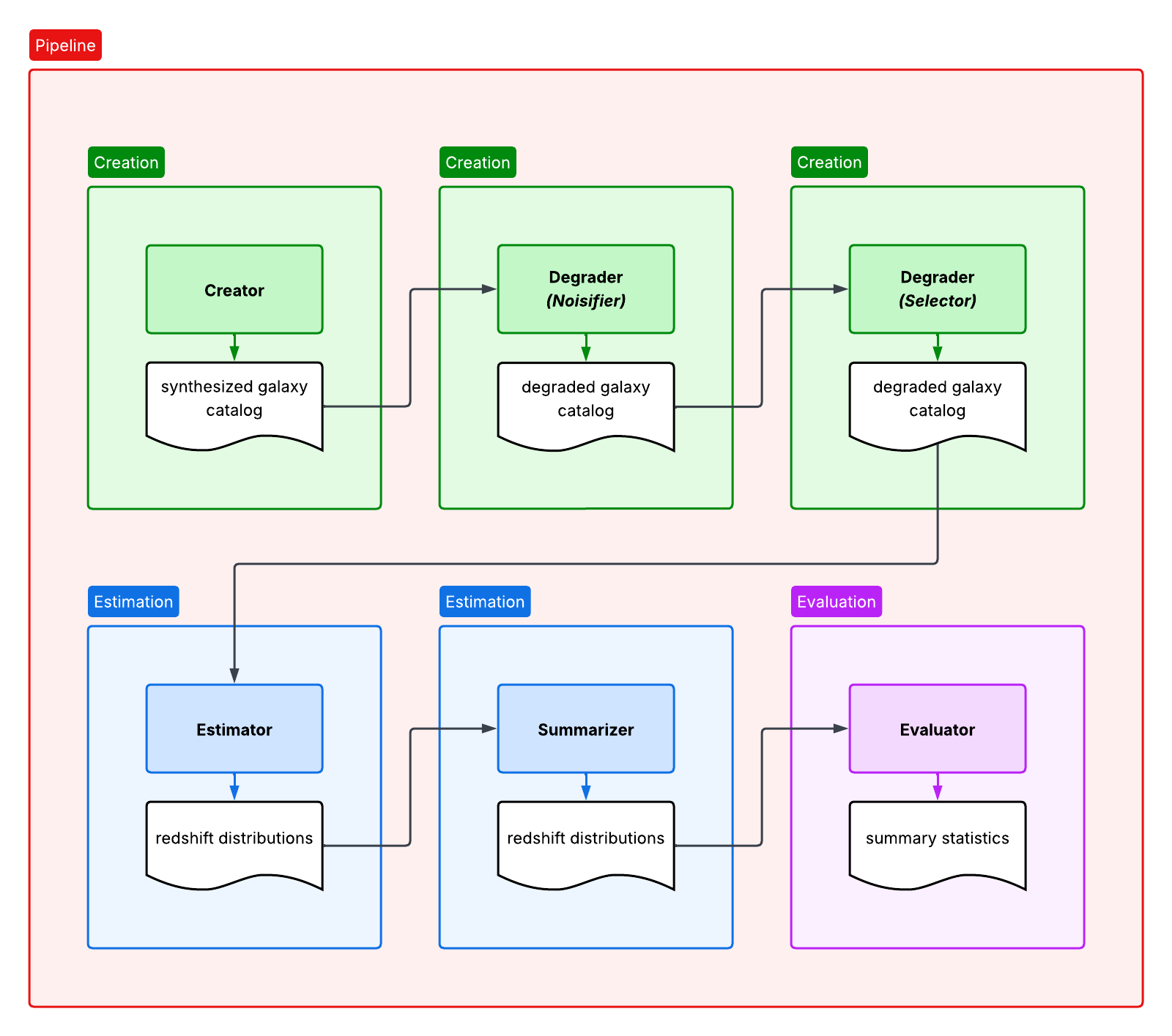
To learn how to run RAIL in an exploratory environment, visit the Interactive Usage page.
Pipeline API
RAIL Pipelines are run via the ceci framework. Execution of a pipeline
entails an initialize() step, in which ceci checks that each stage’s
inputs either exist or will be produced by an earlier stage in the pipeline,
followed by a run() step to actually perform the specified calculations.
To learn more about ceci, visit the ceci documentation.
rail.core.RailPipeline is the base class for all RAIL pipelines.
Subclasses can build particular types of analysis pipelines subject to some
configuration choices, such as which algorithms to use.
- class rail.core.RailPipeline
A pipeline intended for interactive use
Mainly this allows for more concise pipeline specification, along the lines of:
self.stage_1 = Stage1Class.build(…) self.stage_2 = Stage2Class.build(connections=dict(input=self.stage1.io.output), …)
And end up with a fully specified pipeline.
- __init__()
Create a MiniRunner Pipeline
In addition to parent initialization parameters (see the Pipeline base class), this subclass can take these optional keywords.
- Parameters:
callback (function(event_type: str, event_info: dict)) – A function called when jobs launch, complete, or fail, and when the pipeline aborts. Can be used for tracing execution. Default=None.
sleep (function(t: float)) – A function to replace time.sleep called in the pipeline to wait until the next time to check process completion Most normal usage will not need this. Default=None.
- Return type:
None
- classmethod __new__(*args, **kwargs)
Making a pipeline configuration file
- static RailPipeline.build_and_write(class_name, output_yaml, input_dict=None, stages_config=None, output_dir='.', log_dir='.', **kwargs)
Build a RailPipeline and write the config yaml for for it
- Parameters:
class_name (str) – Full name of the class, e.g., rail.core.stage.RailPipeline
output_yaml (str) – Path to the output yaml file
input_dict (dict | None) – Dict of all the inputs needed to run the pipeline
stages_config (dict | None) – Stage configuration overrides
output_dir (str) – Directory to write pipeline outputs to
log_dir (str) – Directory to write pipeline log files to
**kwargs (Any) – Passed as arguements to the pipeline constructor
- Return type:
None
Introspection various types of Pipelines
- classmethod RailPipeline.print_classes()
- Return type:
None
- classmethod RailPipeline.get_pipeline_class(name)
- Parameters:
name (str)
- Return type:
type[RailPipeline]
- static RailPipeline.load_pipeline_class(class_name)
Import a particular RailPipeline subclass by name
- Parameters:
class_name (str) – Full name of the class, e.g., rail.core.stage.RailPipeline
- Returns:
Requested Pipeline sub-class
- Return type:
type[RailPipeline]
Making Pipelines Interactively
Here is an example of the first part of the goldenspike pipeline definition.
 from rail.utils.path_utils import RAILDIR
 flow_file = os.path.join(RAILDIR, 'rail/examples_data/goldenspike_data/data/pretrained_flow.pkl')

class GoldenspikePipeline(RailPipeline):

     default_input_dict = dict(
         model=flow_file,
     )


    def __init__(self):
        RailPipeline.__init__(self)

        bands = ['u','g','r','i','z','y']
        band_dict = {band:f'mag_{band}_lsst' for band in bands}
        rename_dict = {f'mag_{band}_lsst_err':f'mag_err_{band}_lsst' for band in bands}


     self.flow_engine_train = FlowCreator.build(
         model=flow_file,
         n_samples=50,
         seed=1235,
     )

     self.lsst_error_model_train = LSSTErrorModel.build(
         connections=dict(input=self.flow_engine_train.io.output),
         renameDict=band_dict, seed=29,
     )

     self.inv_redshift = InvRedshiftIncompleteness.build(
         connections=dict(input=self.lsst_error_model_train.io.output),
         pivot_redshift=1.0,
     )

     self.line_confusion = LineConfusion.build(
         connections=dict(input=self.inv_redshift.io.output),
         true_wavelen=5007., wrong_wavelen=3727., frac_wrong=0.05,
     )
What this is doing is:
Finding the pretrained model
flow_fileto use to generate data.Defining a class
GoldenspikePipelineto encapsulate the pipeline and setting up that pipeline.Defining some common parameters, e.g.,
bands,bands_dictfor the pipeline.Defining four stages, and adding them to the pipeline, note that for each stage the syntax is more or less the same. We have to define,
The name of the stage, i.e.,
self.flow_engine_trainwill make a stage calledflow_engine_trainthrough some python cleverness.The class of the stage, which is specified by which type of stage we ask to build,
FlowEngine.buildwill make aFlowEnginestage.Any configuration parameters, which are specified as keyword arguments, e.g.,
n_samples=50.Any input connections from other stages, e.g.,
connections=dict(input=self.flow_engine_train.io.output), in theself.lsst_error_model_trainblock will connect theoutputofself.flow_engine_trainto theinputofself.lsst_error_model_train. Later in that example we can see how to connect multiple inputs, e.g., one namedinputand another namedmodel, as required for an estimator stage.
Making a configurable Pipeline
Here is an example of a configurable pipeline, where we select which algorithms to include in the pipeline.
from rail.utils.algo_library import PZ_ALGORITHMS

eval_shared_stage_opts = dict(
    metrics=['all'],
    exclude_metrics=['rmse', 'ks', 'kld', 'cvm', 'ad', 'rbpe', 'outlier'],
    hdf5_groupname="",
    limits=[0, 3.5],
    truth_point_estimates=['redshift'],
    point_estimates=['zmode'],
)


class PzPipeline(RailPipeline):

    default_input_dict={
        'input_train':'dummy.in',
        'input_test':'dummy.in',
    }

    def __init__(self, algorithms: dict|None=None):
        RailPipeline.__init__(self)

        if algorithms is None:
            algorithms = PZ_ALGORITHMS

        for key, val in algorithms.items():
            inform_class = ceci.PipelineStage.get_stage(val['Inform'], val['Module'])
            the_informer = inform_class.make_and_connect(
                name=f'inform_{key}',
                aliases=dict(input='input_train'),
                hdf5_groupname='',
            )
            self.add_stage(the_informer)

            estimate_class = ceci.PipelineStage.get_stage(val['Estimate'], val['Module'])
            the_estimator = estimate_class.make_and_connect(
                name=f'estimate_{key}',
                aliases=dict(input='input_test'),
                connections=dict(
                    model=the_informer.io.model,
                ),
                calculated_point_estimates=['zmode'],
                hdf5_groupname='',
            )
            self.add_stage(the_estimator)

            the_evaluator = SingleEvaluator.make_and_connect(
                name=f'evaluate_{key}',
                aliases=dict(truth='input_test'),
                connections=dict(
                    input=the_estimator.io.output,
                ),
                **eval_shared_stage_opts,
            )
            self.add_stage(the_evaluator)
The main differences with the previous example are that:
We pass in a dict that gives the names of all the algorithms to include, as well as information on how to load the stages in question.
Instead of using
buildwe usemake_and_connectfollowed byadd_stage. This is because we are making several stages of the same type, but with different names, inside a loop, so the cleverness behind thebuildmechanism would not work here.
Making Pipelines with YAML
Coming soon
Data Handles
One particularity of RAIL is that we wrap data in
rail.core.DataHandle objects rather than passing the data directly
to functions. There are a few reasons for this.
Potentially large data volume
One of the challenges that RAIL must address is the potentially very large datasets that we use. At times we will be dealing with billions of objects, and will not be able to load the object tables into the memory of a single processor.
Parallel processing
DataHandle API
rail.core.DataHandle is the class that lets users connect data to
RAIL.
- class rail.core.DataHandle
Class to act as a handle for a bit of data. Associating it with a file and providing tools to read & write it to that file
- __init__(tag, data=None, path=None, creator=None)
Constructor
- Parameters:
tag (str) – The tag under which this data handle can be found in the store
data (DataLike | None) – The associated data
path (str | None) – The path to the associated file
creator (str | None) – The name of the stage that created this data handle
- Return type:
None
- classmethod __new__(*args, **kwargs)
Basic file-like operations
- DataHandle.open(**kwargs)
Open and return the associated file
- Parameters:
**kwargs (Any) – Passed to the call to open the file in question
- Returns:
Newly opened file
- Return type:
FileLike
Notes
This will simply open the file and return a FileLike object to the caller. It will not read or cache the data
- DataHandle.close(**kwargs)
Close the associated file
- Parameters:
kwargs (Any)
- Return type:
None
- DataHandle.read(force=False, **kwargs)
Read and return the data from the associated file
- Parameters:
force (bool) – If true, force re-reading the data
**kwargs (Any) – Passed to the call to read the data
- Returns:
Data that were read
- Return type:
DataLike
Notes
This will read the entire file, and while useful for testing on small files, will not work on very large files.
- DataHandle.write(**kwargs)
Write the data to the associated file
- Parameters:
kwargs (Any)
- Return type:
None
Operations for parallelized access to data
- DataHandle.iterator(**kwargs)
Iterator over the data
- Parameters:
kwargs (Any)
- Return type:
Iterable
- DataHandle.size(**kwargs)
Return the size of the data associated to this handle
- Parameters:
kwargs (Any)
- Return type:
int
- DataHandle.data_size(**kwargs)
Return the size of the in memory data
- Parameters:
kwargs (Any)
- Return type:
int
- DataHandle.initialize_write(data_length, **kwargs)
Initialize file to be written by chunks
- Parameters:
data_length (int) – Number of rows of data that we will write, used to reserve space
**kwargs (Any) – Information about the columns we will write
- Return type:
None
- DataHandle.write_chunk(start, end, **kwargs)
Write the data to the associated file
- Parameters:
start (int) – Index of starting row for this chunk of data
end (int) – Index of ending row for this chunk of data
**kwargs (Any) – Passed to call to write this chunk of data
- Return type:
None
- DataHandle.finalize_write(**kwargs)
Finalize and close file written by chunks
- Parameters:
**kwargs (Any) – Passed to call to write this chunk of data
- Return type:
None
- DataHandle.iterator(**kwargs)
Iterator over the data
- Parameters:
kwargs (Any)
- Return type:
Iterable
- DataHandle.size(**kwargs)
Return the size of the data associated to this handle
- Parameters:
kwargs (Any)
- Return type:
int
Functions for working with DataHandles
- DataHandle.set_data(data, partial=False)
Set the data for a chunk, and set the partial flag to true
- Parameters:
data (rail.core.data.DataLike)
partial (bool)
- Return type:
None
- classmethod DataHandle.make_name(tag)
Construct and return file name for a particular data tag
- Parameters:
tag (str)
- Return type:
str