Clustering redshifts with yet_another_wizz
This notebooks summarises the steps to compute clustering redshifts for an unknown sample of galaxies using a reference sample with known redshifts. Additionally, a correction for the galaxy bias of the reference sample is applied (see Eqs. 17 & 20 in van den Busch et al. 2020).
This involves a number of steps (see schema below): 1. Preparing the input data (creating randoms, applying masks; simplfied here). 2. Splitting the data into spatial patches and cache them on disk for faster access. 3. Computing the autocorrelation function amplitude \(w_{\rm ss}(z)\), used as correction for the galaxy bias 4. Computing the cross-correlation function amplitude \(w_{\rm sp}(z)\), which is the biased redshift estimate. 5. Summarising the result by correcting for the refernece sample bias and producing a redshift estimate (not a PDF!).
Note: The cached data must be removed manually since its lifetime can currently not be handled by RAIL.
The aim of this notebook is to give an overview of the wrapper functionality, including a summary of all currently implemented optional parameters (commented). It is not meant to be a demonstaration of the performance of yet_another_wizz since the example data used here is very small and the resulting signal-to-noise ratio is quite poor.
Note: If you’re planning to run this in a notebook, you may want to
use interactive mode instead. See
YAW.ipynb
in the interactive_examples/estimation_examples/ folder for a
version of this notebook in interactive mode.
import matplotlib.pyplot as plt

from rail.core.data import TableHandle, Hdf5Handle

from rail.core.stage import RailStage
import tables_io
# step 1
from yaw.randoms import BoxRandoms
from rail.yaw_rail.utils import get_dc2_test_data

from rail.estimation.algos.cc_yaw import (
    create_yaw_cache_alias,  # utility for YawCacheCreate
    YawCacheCreate,     # step 2
    YawAutoCorrelate,   # step 3
    YawCrossCorrelate,  # step 4
    YawSummarize,       # step 5
)  # equivalent: from rail.yaw_rail import *
VERBOSE = "debug" # verbosity level of built-in logger, disable with "error"
1. Data preparation
Since this is a simple example, we are not going into the details of creating realistic randoms and properly masking the reference and unknown data to a shared footprint on sky. Instead, we are using a simulated dataset that serves as both, reference and unknown sample.
First, we download the small test dataset derived from 25 sqdeg of DC2, containing 100k objects on a limited redshift range of \(0.2 < z < 1.8\). We add the data as new handle to the datastore.
test_data = get_dc2_test_data()  # downloads test data, cached for future calls
redshifts = test_data["z"].to_numpy()
zmin = redshifts.min()
zmax = redshifts.max()
n_data = len(test_data)
print(f"N={n_data}, {zmin:.1f}<z<{zmax:.1f}")

handle_test_data = Hdf5Handle("input_data",data=test_data)
N=100000, 0.2<z<1.8
Next we generate a x10 enhanced uniform random dataset for the test data
constrained to its rectangular footprint. We add redshifts by cloning
the redshift column "z" of the dataset. We add the randoms as new
handle to the datastore.
generator = BoxRandoms(
    test_data["ra"].min(),
    test_data["ra"].max(),
    test_data["dec"].min(),
    test_data["dec"].max(),
    redshifts=redshifts,
    seed=12345,
)
test_rand = generator.generate_dataframe(n_data * 10)
test_rand.rename(columns=dict(redshifts="z"), inplace=True)

handle_test_rand = Hdf5Handle("input_rand", data=test_rand)
2. Splitting and caching the data
This step is crucial to compute consistent clustering redshift uncertainties. yet_another_wizz uses spatial (jackknife) resampling and therefore, every input dataset must be split into the same exact spatial regions/patches. To improve the parallel performance, the datasets and randoms are pre-arranged into these patches and cached on disk for better random patch-wise access. While this is slow for small datasets, it is highly beneficial for large datasets with many patches and/or memory constraints.
The RAIL wrapper uses manually specified cache directories, each of
which contains one dataset and optionally corresponding randoms. This
ensures that the patch centers are defined consistently. To create a new
cache, use the YawCacheCreate.create() method.
Note on names and aliasing in RAIL
We need to create separate caches for the reference and the unknown
data, which means that we need to run the YawCacheCreate twice.
Since that creates name clashes in the RAIL datastore, we need to
properly alias the inputs (data/ rand) and the output
(cache) by providing a dictionary for the aliases parameter when
calling the make_stage(), e.g. by adding a unique suffix:
name = "stage_name"
aliases = dict(data="data_suffix", rand="rand_suffix", cache="cache_suffix")
There is a shorthand for convenience
(from rail.yaw_rail.cache.AliasHelper) that allows to generate this
dictionary by just providing a suffix name for the stage instance (see
example below).
name = "stage_name"
aliases = create_yaw_cache_alias("suffix")
The reference data
To create a cache directory we must specify a path to the directory
at which the data will be cached. This directory must not exist yet. We
also have to specify a name for the stage to ensure that the
reference and unknown caches (see below) are properly aliased to be
distinguishable by the RAIL datastore.
Furthermore, a few basic column names that describe the tabular input
data must be provided. These are right ascension (ra_name) and
declination (dec_name), and in case of the reference sample also the
redshifts (redshift_name). Finally, the patches must be defined and
there are three ways to do so: 1. Stage parameter patch_file: Read
the patch center coordinates from an ASCII file with pairs of
R.A/Dec. coordinates in radian. 2. Stage parameter patch_num:
Generating a given number of patches from the object positions
(peferrably of the randoms if possible) using k-means clustering. 3.
Stage parameter patch_name: Providing a column name in the input
table which contains patch indices (using 0-based indexing). 4. Stage
input patch_source: Using the patch centers from a different cache
instance, given by a cache handle. When this input is provided it takes
precedence over any of the stage parameters above.
In this example we choose to auto-generate five patches. In a more realistic setup this number should be much larger.
stage_cache_ref = YawCacheCreate.make_stage(
    name="cache_ref",
    aliases=create_yaw_cache_alias("ref"),
    path="run/test_ref",
    overwrite=True,  # default: False
    ra_name="ra",
    dec_name="dec",
    redshift_name="z",
    # weight_name=None,
    # patch_name=None,
    patch_num=5,  # default: None
    # max_workers=None,
    verbose=VERBOSE,  # default: "info"
)
handle_cache_ref = stage_cache_ref.create(
    data=handle_test_data,
    rand=handle_test_rand,
    # patch_source=None,
)
Inserting handle into data store.  data_ref: None, cache_ref
Inserting handle into data store.  rand_ref: None, cache_ref
YAW | yet_another_wizz v3.1.2
INF | running in multiprocessing environment with 2 workers
Inserting handle into data store.  patch_source_ref: None, cache_ref
INF | loading 1M records in 1 chunks from memory
DBG | selecting input columns: ra, dec, z
DBG | creating 5 patches
INF | computing 5 patch centers from subset of 224K records
DBG | running preprocessing on 2 workers
INF | using cache directory: run/test_ref/rand
INF | computing patch metadata
DBG | running parallel jobs on 2 workers
INF | loading 100K records in 1 chunks from memory
DBG | selecting input columns: ra, dec, z
DBG | applying 5 patches
DBG | running preprocessing on 2 workers
INF | using cache directory: run/test_ref/data
INF | computing patch metadata
DBG | running parallel jobs on 2 workers
Inserting handle into data store. output_cache_ref: inprogress_output_cache_ref.path, cache_ref
We can see from the log messages that yet_another_wizz processes the
randoms first and generates patch centers (creating 5 patches) and
then applies them to the dataset, which is processed last
(applying 5 patches). Caching the data can take considerable time
depending on the hardware and the number of patches.
The unknown data
The same procedure for the unknown sample, however there are some small,
but important differences. We use a different path and name, do
not specify the redshift_name (since we would not have this
information with real data), and here we chose to not provide any
randoms for the unknown sample and instead rely on the reference sample
randoms for cross-correlation measurements.
Most importantly, we must ensure that the patch centers are consistent
with the reference data and therefore provide the reference sample cache
as a stage input called patch_source.
Important: Even if the reference and unknown data are the same as in
this specific case, the automatically generated patch centers are not
deterministic. We can see in the log messages that the code reports
applying 5 patches.
stage_cache_unk = YawCacheCreate.make_stage(
    name="cache_unk",
    aliases=create_yaw_cache_alias("unk"),
    path="run/test_unk",
    overwrite=True,  # default: False
    ra_name="ra",
    dec_name="dec",
    # redshift_name=None,
    # weight_name=None,
    # patch_name=None,
    # patch_num=None,
    # max_workers=None,
    verbose=VERBOSE,  # default: "info"
)
handle_cache_unk = stage_cache_unk.create(
    data=handle_test_data,
    # rand=None,
    patch_source=handle_cache_ref,
)
Inserting handle into data store.  data_unk: None, cache_unk
Inserting handle into data store.  patch_source_unk: None, cache_unk
YAW | yet_another_wizz v3.1.2
INF | running in multiprocessing environment with 2 workers
Inserting handle into data store.  rand_unk: None, cache_unk
INF | loading 100K records in 1 chunks from memory
DBG | selecting input columns: ra, dec
DBG | applying 5 patches
DBG | running preprocessing on 2 workers
INF | using cache directory: run/test_unk/data
INF | computing patch metadata
DBG | running parallel jobs on 2 workers
Inserting handle into data store. output_cache_unk: inprogress_output_cache_unk.path, cache_unk
3. Computing the autocorrelation / bias correction
The bias correction is computed from the amplitude of the angular autocorrelation function of the reference sample. The measurement parameters are the same as for the cross-correlation amplitude measurement, so we can define all configuration parameters once in a dictionary.
As a first step, we need to decide on which redshift bins/sampling we
want to compute the clustering redshifts. Here we choose the redshift
limits of the reference data (zmin/zmax) and, since the sample
is small, only 8 bins (zbin_num) spaced linearly in redshift
(default method="linear"). Finally, we have to define the physical
scales in kpc (rmin/rmax, converted to angular separation at
each redshift) on which we measure the correlation amplitudes.
Optional parameters: Bins edges can alternatively specifed manually
through zbins. To apply scale dependent weights,
e.g. \(w \propto r^{-1}\), specify the power-law exponent
asrweight=-1. The parameter resolution specifies the radial
resolution (logarithmic) of the weights.
corr_config = dict(
    rmin=100,   # in kpc
    rmax=1000,  # in kpc
    # rweight=None,
    # resolution=50,
    zmin=zmin,
    zmax=zmax,
    num_bins=8,  # default: 30
    # method="linear",
    # edges=np.linspace(zmin, zmax, zbin_num+1)
    # closed="right",
    # max_workers=None,
    verbose=VERBOSE,  # default: "info"
)
We then measure the autocorrelation using the
YawAutoCorrelate.correlate() method, which takes a single parameter,
the cache (handle) of the reference dataset.
stage_auto_corr = YawAutoCorrelate.make_stage(
    name="auto_corr",
    **corr_config,
)
handle_auto_corr = stage_auto_corr.correlate(
    sample=handle_cache_ref,
)
Inserting handle into data store.  output_cache_ref: None, auto_corr
YAW | yet_another_wizz v3.1.2
INF | running in multiprocessing environment with 2 workers
INF | building data trees
DBG | building patch-wise trees (using 8 bins)
DBG | running parallel jobs on 2 workers
INF | building random trees
DBG | building patch-wise trees (using 8 bins)
DBG | running parallel jobs on 2 workers
INF | computing auto-correlation from DD, DR, RR
DBG | computing patch linkage with max. separation of 1.42e-03 rad
DBG | created patch linkage with 19 patch pairs
DBG | using 1 scales without weighting
INF | counting DD from patch pairs
DBG | running parallel jobs on 2 workers
INF | counting DR from patch pairs
DBG | running parallel jobs on 2 workers
INF | counting RR from patch pairs
DBG | running parallel jobs on 2 workers
Inserting handle into data store. output_auto_corr: inprogress_output_auto_corr.hdf5, auto_corr
As the code is progressing, we can observe the log messages of yet_another_wizz which indicate the performed steps: getting the cached data, generating the job list of patches to correlate, and counting pairs. Finally, the pair counts are stored as custom data handle in the datastore.
We can interact with the returned pair counts (yaw.CorrFunc,
documentation)
manually if we want to investigate the results:
counts_auto = handle_auto_corr.data  # extract payload from handle
counts_auto.dd
NormalisedCounts(auto=True, binning=8 bins @ (0.200...1.800], num_patches=5)
4. Computing the cross-correlation / redshift estimate
The cross-correlation amplitude, which is the biased estimate of the
unknown redshift distribution, is computed similarly to the
autocorrelation above. We measure the correlation using the
YawCrossCorrelate.correlate() method, which takes two parameters,
the cache (handles) of the reference and the unknown data.
stage_cross_corr = YawCrossCorrelate.make_stage(
    name="cross_corr",
    **corr_config,
)
handle_cross_corr = stage_cross_corr.correlate(
    reference=handle_cache_ref,
    unknown=handle_cache_unk,
)
Inserting handle into data store.  output_cache_ref: None, cross_corr
Inserting handle into data store.  output_cache_unk: None, cross_corr
YAW | yet_another_wizz v3.1.2
INF | running in multiprocessing environment with 2 workers
INF | building reference data trees
DBG | building patch-wise trees (using 8 bins)
DBG | running parallel jobs on 2 workers
INF | building reference random trees
DBG | building patch-wise trees (using 8 bins)
DBG | running parallel jobs on 2 workers
INF | building unknown data trees
DBG | building patch-wise trees (unbinned)
DBG | running parallel jobs on 2 workers
INF | computing cross-correlation from DD, RD
DBG | computing patch linkage with max. separation of 1.42e-03 rad
DBG | created patch linkage with 19 patch pairs
DBG | using 1 scales without weighting
INF | counting DD from patch pairs
DBG | running parallel jobs on 2 workers
INF | counting RD from patch pairs
DBG | running parallel jobs on 2 workers
Inserting handle into data store. output_cross_corr: inprogress_output_cross_corr.hdf5, cross_corr
As before, we can see the actions performed by yet_another_wizz. The main difference for the cross-correlation function is that the second sample (the unknown data/randoms) are not binned by redshift when counting pairs.
As for the autocorrelation, we can interact with the result, e.g. by evaluating the correlation estimator manually and getting the cross-correlation amplitude per redshift bin.
counts_cross = handle_cross_corr.data  # extract payload from handle
corrfunc = counts_cross.sample()  # evaluate the correlation estimator
corrfunc.data
DBG | sampling correlation function with estimator 'DP'
array([0.0023559 , 0.00403239, 0.00684468, 0.01126758, 0.00945143,
       0.00898257, 0.00882812, 0.01273689])
5. Computing the redshift estimate
The final analysis step is combining the two measured correlation amplitudes to get a redshift estimate which is corrected for the reference sample bias. This estimate is not a PDF. Converting the result to a proper PDF (without negative values) is non-trivial and requires further modelling stages that are currently not part of this wrapper.
We use YawSummarize.summarize() method, which takes the pair count
handles of the cross- and autocorrelation functions as input. In
principle, the autocorrelation of the unknown sample could be specified
to fully correct for galaxy bias, however this is not possible in
practice since the exact redshifts of the unknown objects are not known.
stage_summarize = YawSummarize.make_stage(
    name="summarize",
    verbose=VERBOSE,  # default: "info"
)
handle_summarize = stage_summarize.summarize(
    cross_corr=handle_cross_corr,
    auto_corr_ref=handle_auto_corr,  # default: None
    # auto_corr_unk=None,
)
Inserting handle into data store.  output_cross_corr: None, summarize
Inserting handle into data store.  output_auto_corr: None, summarize
YAW | yet_another_wizz v3.1.2
INF | running in multiprocessing environment with 2 workers
Inserting handle into data store.  auto_corr_unk: None, summarize
DBG | sampling correlation function with estimator 'DP'
DBG | sampling correlation function with estimator 'LS'
DBG | computing clustering redshifts from correlation function samples
DBG | mitigating reference sample bias
Inserting handle into data store. output_summarize: inprogress_output_summarize.pkl, summarize
The stage produces a single output which contains the redshift estimate
with uncertainties, jackknife samples of the estimate, and a covariance
matrix. These data products are wrapped as yaw.RedshiftData
documentation
which gets stored as pickle file when running a ceci pipeline.
Some examples on how to use this data is shown below.
Remove caches
The cached datasets are not automatically removed, since the algorithm does not know when they are no longer needed. Additionally, the reference data could be resued for future runs, e.g. for different tomographic bins.
Since that is not the case here, we just delete the cached data with a built-in method.
handle_cache_ref.data.drop()
handle_cache_unk.data.drop()
Inspect results
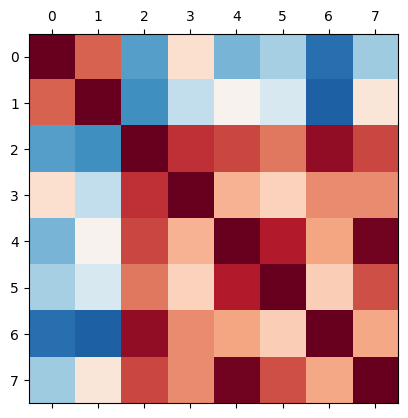
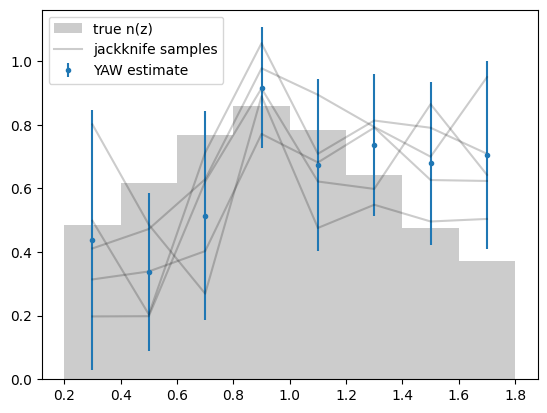
Below are some examples on how to access the redshift binning, estimate, estimte error, samples and covariance matrix produced by yet_another_wizz.
ncc = handle_summarize.data
ncc.data / ncc.error  # n redshift slices
array([1.07182461, 1.35668927, 1.56375463, 4.83102594, 2.48537537,
       3.28650675, 2.64576631, 2.38672804])
# true n(z)
zbins = handle_cross_corr.data.binning.edges
plt.hist(test_data["z"], zbins, density=True, color="0.8", label="true n(z)")

# fiducial n(z)
normalised = ncc.normalised()  # copy of data with n(z) is normalised to unity
ax = normalised.plot(label="YAW estimate")

# jackknife samples
normalised.samples.shape  # m jackknife-samples x n redshift slices
z = normalised.binning.mids
plt.plot(z, normalised.samples.T, color="k", alpha=0.2)
# create a dummy for the legend
plt.plot([], [], color="k", alpha=0.2, label="jackknife samples")
ax.legend()
DBG | normalising RedshiftData
<matplotlib.legend.Legend at 0x7f916834d060>
ncc.covariance.shape  # n x n redshift slices
ncc.plot_corr()
<Axes: >