Running RAIL with a different dataset
Authors: Sam Schmidt
Last run successfully: September 24, 2025
This is a notebook with a quick example of running a rail algoritm
with a different dataset and overriding configuration parameters.
Most of our other demo notebooks use small datasets included with the
RAIL demo package, all with the same input names. These datasets are
named consistently with many of the default parameter values used in
RAIL, e.g. hdf5_groupname="photometry" and ugrizy photometry named
in a pattern "mag_{band}_lsst", often specified in
SHARED_PARAMS.
This notebook will just show a quick run with an alternate dataset, showing the values that users will likely need to change in order to get things running.
Note: If you’re planning to run this in a notebook, you may want to
use interactive mode instead. See
Running_with_different_data.ipynb
in the interactive_examples/estimation_examples/ folder for a
version of this notebook in interactive mode.
import os
import matplotlib.pyplot as plt
import numpy as np
import tables_io
First, we’ll start with grabbing some small datasets from NERSC, a tar file with some data drawn from the Roman-Rubin simulation:
training_file = "./romanrubin_demo_data.tar"

if not os.path.exists(training_file):
  os.system('curl -O https://portal.nersc.gov/cfs/lsst/PZ/romanrubin_demo_data.tar')
  os.system('tar -xvf romanrubin_demo_data.tar')
    % Total    % Received % Xferd  Average Speed   Time    Time     Time  Current
                                   Dload  Upload   Total   Spent    Left  Speed

0     0    0     0    0     0      0      0 --:--:-- --:--:-- --:--:--     0
romanrubin_train_data.hdf5
romanrubin_test_data.hdf5
54 4670k 54 2555k 0 0 2496k 0 0:00:01 0:00:01 --:--:-- 2498k
100 4670k 100 4670k 0 0 4213k 0 0:00:01 0:00:01 –:–:– 4214k
Let’s load one of the files and look at the contents:
infile = "romanrubin_train_data.hdf5"
data = tables_io.read(infile)
data.keys()
odict_keys(['H', 'H_err', 'J', 'J_err', 'g', 'g_err', 'i', 'i_err', 'r', 'r_err', 'redshift', 'u', 'u_err', 'y', 'y_err', 'z', 'z_err'])
We can see that, unlike the demo data in other notebooks, there is no
top level hdf5_groupname of “photometry”, the data is directly in the
top level of the hdf5 file. As such, we will need to specify
hdf5_groupname="" to override the default value of "photometry"
in RAIL.
We also see that the magnitudes and errors are simply named with the
band name, e.g. "u" rather than "mag_u_lsst". Again, we will
need to specify the band and error names in order to override the
defaults in RAIL. Let’s do that below, using the KNearNeighInformer and
Estimator algorithms:
from rail.core.data import TableHandle
from rail.core.stage import RailStage
from rail.estimation.algos.k_nearneigh import KNearNeighInformer, KNearNeighEstimator
trainFile = "./romanrubin_train_data.hdf5"
testFile = "./romanrubin_test_data.hdf5"
training_data = tables_io.read(trainFile)
test_data = tables_io.read(testFile)
# training_data = DS.read_file("training_data", TableHandle, trainFile)
# test_data = DS.read_file("test_data", TableHandle, testFile)
The dataset-specific parameters
We will need to specify several parameters to override the default
values in RAIL, we can create a dictionary of these and pass those into
the make_stage for our informer. Because we have Roman J and H, we
will also demonstrate running with 8 bands rather than the default six.
RAIL requires that we specify the names of the input columns as
bands, and the input errors on those as err_bands. Most
algorithms also require a ref_band. To handle non-detections, RAIL
uses a dictionary of mag_limits which must contain keys for all of
the columns in bands and a float for the value with which the
non-detect will be replaced. You may also need to specify a different
nondetect_val if the dataset has a different convention for
non-detections (in this dataset, our non-detetions have a value of
np.inf).
NOTE: RAIL uses SHARED_PARAMS, a central location for specifying
a subset of parameters that are common to a dataset, and setting them in
one place when running multiple algorithms. However, any configuration
parameters specified as SHARED_PARAMS can be overridden in the same
way as any other parameter, there is nothing special about them, and we
will do that here with bands, err_bands, etc…
Let’s set up our dictionary with these values:
bands = ['u', 'g', 'r', 'i', 'z', 'y', 'J', 'H']
errbands = []
maglims = {}
limvals = [27.8, 29.0, 29.1, 28.6, 28.0, 27.0, 26.4, 26.4]
for band, limval in zip(bands, limvals):
    errbands.append(f"{band}_err")
    maglims[band] = limval


print(bands)
print(errbands)
print(maglims)
['u', 'g', 'r', 'i', 'z', 'y', 'J', 'H']
['u_err', 'g_err', 'r_err', 'i_err', 'z_err', 'y_err', 'J_err', 'H_err']
{'u': 27.8, 'g': 29.0, 'r': 29.1, 'i': 28.6, 'z': 28.0, 'y': 27.0, 'J': 26.4, 'H': 26.4}
knn_dict = dict(hdf5_groupname='', bands=bands, err_bands=errbands, mag_limits=maglims, ref_band='i')
We can now feed this into our inform stage:
pz_train = KNearNeighInformer.make_stage(name='inform_KNN', model='rd_demo_knn.pkl', **knn_dict)
%%time
pz_train.inform(training_data)
Inserting handle into data store. input: None, inform_KNN
split into 11250 training and 3750 validation samples
finding best fit sigma and NNeigh...
best fit values are sigma=0.017222222222222222 and numneigh=7


Inserting handle into data store.  model_inform_KNN: inprogress_rd_demo_knn.pkl, inform_KNN
CPU times: user 14.1 s, sys: 2.12 s, total: 16.2 s
Wall time: 16.2 s
<rail.core.data.ModelHandle at 0x7f627ee43f70>
We can use the same dictionary to specify overrides for the estimator stage:
pz = KNearNeighEstimator.make_stage(name='KNN', model=pz_train.get_handle('model'), **knn_dict)
results = pz.estimate(test_data)
Inserting handle into data store.  input: None, KNN
Inserting handle into data store.  model_inform_KNN: <class 'rail.core.data.ModelHandle'> rd_demo_knn.pkl, (wd), KNN
Process 0 running estimator on chunk 0 - 20,000
Process 0 estimating PZ PDF for rows 0 - 20,000
Inserting handle into data store. output_KNN: inprogress_output_KNN.hdf5, KNN
Let’s plot the mode vs the true redshift to make sure that things ran properly:
zmode = results().ancil['zmode'].flatten()
Let’s plot the redshift mode against the true redshifts to see how they look:
plt.figure(figsize=(8,8))
plt.scatter(test_data['redshift'],zmode,s=1,c='k',label='KNN mode')
plt.plot([0,3],[0,3],'r--');
plt.xlabel("true redshift")
plt.ylabel("KNN mode")
Text(0, 0.5, 'KNN mode')
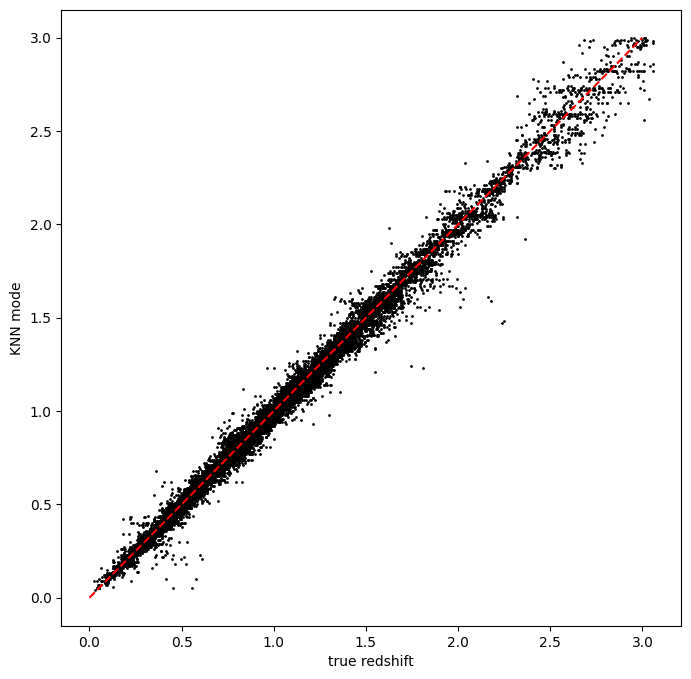
Yes, things look very nice, and the inclusion of NIR photometry gives us very little scatter and very few outliers!